
⚡ THE ESSENTIALS IN 20 SECONDS
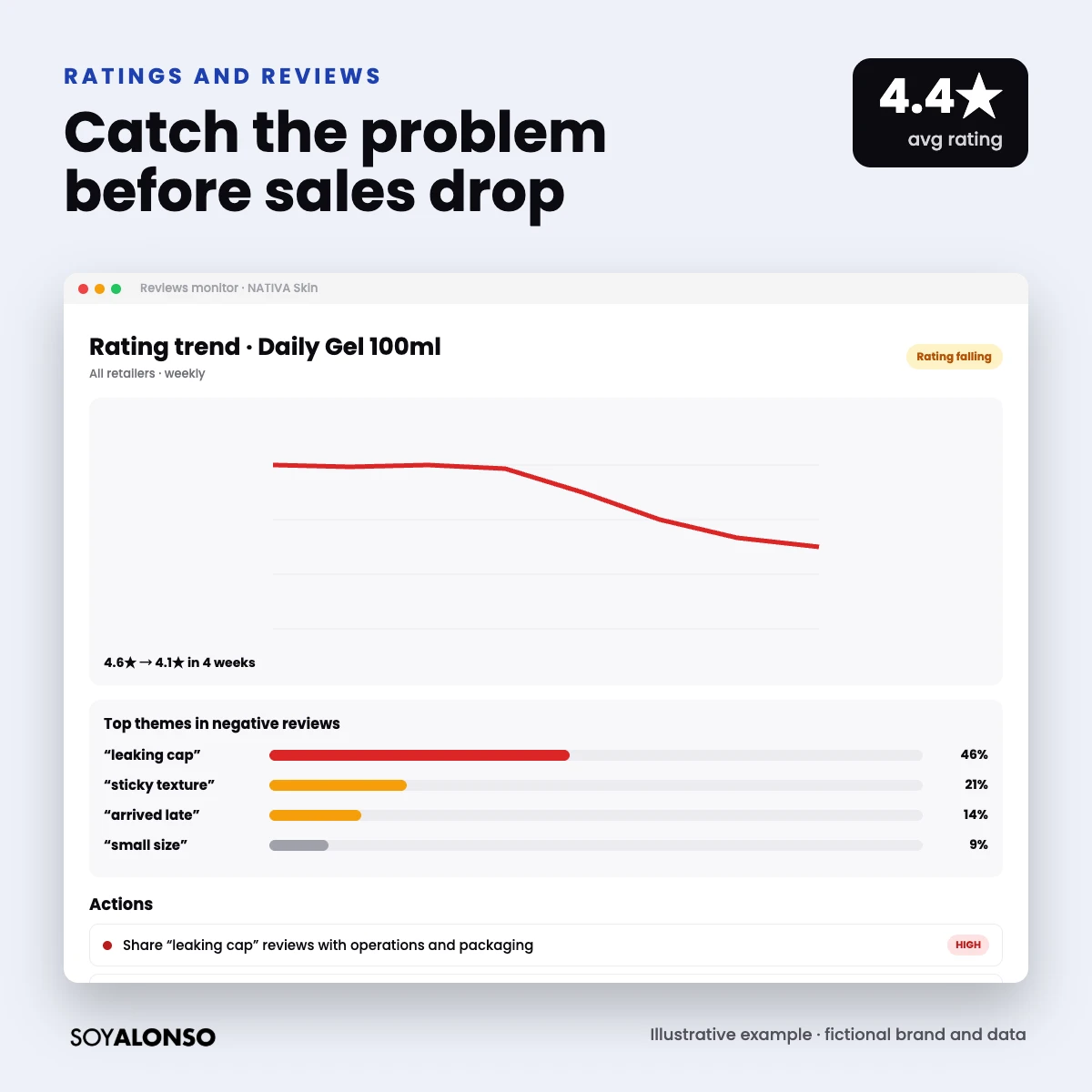
- A rating drop from 4.6 to 4.1 can cut conversion and make every paid sale more expensive.
- Profitero alerts on negative reviews and benchmarks your ratings against Amazon fast movers.
- The value is in finding the recurring theme (packaging, taste, size, shipping) and fixing it.
- While it is being fixed, it is wise to moderate spend on that SKU.
IN THIS ARTICLE
Reviews are your product’s most honest salesperson… and its harshest. A wave of negative comments can sink your conversion in a few weeks, and if you do not see it in time you will think your campaigns are the problem. In this article I explain how to use Profitero to watch ratings and reviews, and what to do with your advertising when things go wrong.
Why reviews move your ROAS
Shoppers see your stars before your price. If your rating drops, fewer people click and fewer of those who click buy. Result: with the same bid you sell less and your ACOS rises. A poor rating also usually points to a real problem (quality, packaging, a description that does not match) that advertising only makes more visible.
What Profitero monitors
According to its official site, the Digital Shelf module includes negative review alerts and benchmarks your ratings against Amazon “Fast Movers”, meaning fast-selling products. This adds to the other shelf signals, so you can see on one screen whether a sales drop comes from reviews, out-of-stocks or price.
Read reviews like an analyst
- Look at the trend, not a single review. Three comments on the same theme in one week are already a signal.
- Group by theme: packaging, quality, taste or smell, size, shipping, expectation (the listing promises something different).
- Separate what you control: a retailer shipping issue is solved differently from a formula issue.
- Compare by retailer: if the problem only shows up at one, it may be logistics or storage.
- Check questions too: many repeated questions mean your listing is missing information.
What to do with your ads
The rating drops or a negative theme repeats.
Group reviews and find the cause (product, listing or shipping).
Operations fixes the product; you adjust the listing if it over-promises.
Lower bids on the affected SKU until reviews improve.
| Situation | Recommended action |
|---|---|
| Product or packaging problem | Moderate spend on that SKU and escalate to operations |
| The listing promises something it does not deliver | Fix the title, bullets and images |
| Shipping problem at one retailer | Escalate with the retailer and review the logistics model |
| Good but few reviews | Use the retailer’s review programs, such as Amazon Vine |
Never try to “cover” bad reviews with more advertising. All you achieve is more people buying a product with a problem, which creates more negative reviews.
A monthly review routine
I recommend a 30-minute monthly review in three steps. First, check the rating of your top 10 SKUs at each retailer and flag any that dropped more than 0.2 stars. Second, read the negative reviews for those SKUs and group them by theme. Third, send a short summary to the product and operations teams with the main theme, the number of mentions and a proposed action. Repeat this every month and you catch problems before they show up in the sales report, and your media team stops fighting against a product that is not convincing shoppers. It also gives leadership a simple, recurring view of product health that goes beyond sales and ROAS.
Agency secrets about reviews
What I learned listening to shoppers:
The themes in your competitors’ negative reviews tell you what to highlight on your own listing.
A monthly theme report for the product team is gold. Many improvements come from there.
If your best seller’s rating drops, the whole portfolio feels it. Fix it first.
Once, a sales drop everyone blamed on competition turned out to be a badly designed cap. The reviews had been saying so for a month; nobody was reading them.
I’m Alonso Jiménez, a Retail Media account director. I manage campaigns on Amazon, Walmart, Target, Instacart and Mercado Libre every day, for brands in the US, Mexico and Latin America. In the Profitero series I show how every shelf signal changes your investment decisions. Next, see how to stop paying for out-of-stock products.
Frequently asked questions
Does Profitero monitor reviews?
Yes. Its Digital Shelf module includes negative review alerts and rating benchmarks against fast-selling Amazon products.
Do reviews affect my ads?
Yes, indirectly: a lower rating reduces clicks and conversion, which raises your cost per sale.
Should I pause ads if my rating drops?
Not always. Moderate spend on the affected SKU while the cause is fixed, especially if it is a product problem.
Can I ask for negative reviews to be removed?
Only if they violate the retailer’s policies. The right way to improve is to fix the cause and provide good service.